




Give AI enough context
A brief note: AI-generated images should not be used on Google Business Profile, whether for photos, updates, or any other type of content. They can, however, be used for social media content where appropriate.
When using AI-generated images for social media, it is important to provide clear and specific instructions to ensure the output aligns with the Kayakomat brand.
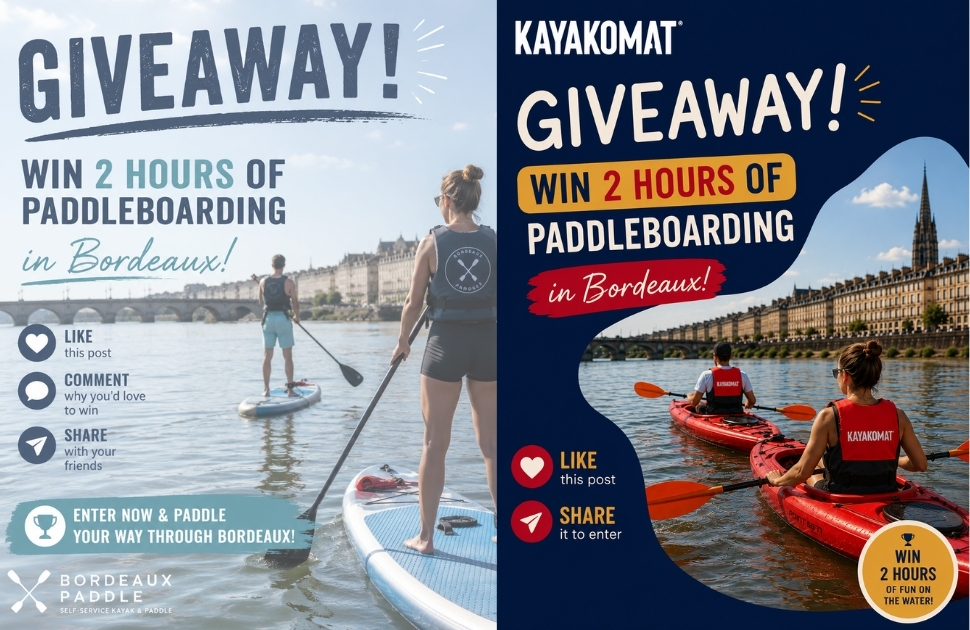
DON’T: “Create a giveaway post for my self-service kayak company. Win two hours of paddleboarding in Bordeaux. Feature people kayaking in a realistic style.”
This prompt leaves too much room for interpretation. AI may use:
- Incorrect colours or typography
- The wrong kayak or SUP models
- Incorrectly coloured or missing life jackets
- The wrong logo or logo placement
- A visual style that does not match Kayakomat
DO: “Create an Instagram giveaway post for Kayakomat Bordeaux promoting two free hours of paddleboarding. The target audience is local adults, couples, and families looking for an outdoor activity. Use the attached Kayakomat brand guidelines, logo, and previous social media posts as references. Match the brand colours, typography, and visual style. Show the correct SUP models and ensure everyone is wearing the correct life jackets. Keep the design modern, energetic, friendly, and easy to understand. Include the call-to-action: ‘Like this post and share it to enter.”
Tell AI what you want to create, who it’s for, how it should look, and provide brand references. The more context you give, the better the output:
Tell AI what you want to create, who it’s for, how it should look, and provide brand references. The more context you give, the better the output. To create an effective AI prompt, include these six key elements:
- Goal: What should the AI create?
- Context: What is the campaign or task about?
- Brand: Which brand guidelines should the AI follow?
- Audience: Who is the target audience?
- Examples: What references or examples should the AI use?
- Style: What tone, look, and feel should the final result have?
Attach relevant examples whenever possible
AI does not automatically know the Kayakomat brand. Include relevant files, logos, and pictures with your prompt. AI performs better when it can learn from examples.
Helpful Kayakomat resources
- Brand guidelines
- Brand assets
- Branded templates
- Previous examples: MyKayakomat or the Kayakomat Instagram page
Always review generated content before publishing
Use the checklist below to verify that your visuals, copy, and branding meet Kayakomat standards:
Is the correct Kayakomat logo used and placed correctly?
☐ Check that the official logo is used.
☐ Ensure the size, placement, and spacing follow the brand guidelines.
Do the colours match the Kayakomat brand?
☐ Verify that the correct brand colour palette is used consistently.
Does the font match the Kayakomat style?
☐ Confirm that the approved fonts and text hierarchy follow the brand guidelines.
Are the correct models and colours shown?
☐ Ensure that the featured kayaks and stand-up paddleboards are accurate and use the correct colour variants.
Is everyone wearing the correct life jacket and are the colours correct?
☐ Verify that all people shown are wearing approved Kayakomat life jackets in the correct colours.
Does the design look and feel like Kayakomat?
☐ Review the overall visual identity to ensure it reflects the Kayakomat brand.
Is the copy friendly, authentic, inspiring, and easy to understand?
☐ Check that the messaging aligns with Kayakomat’s tone of voice.
Does the content fit your location, audience, and campaign?
☐ Make sure the content is tailored to the correct market and target audience.
Are all prices, dates, locations, links, and calls-to-action correct?
☐ Verify that all factual information is accurate and up to date.
Are there any distorted people, objects, logos, or text?
☐ Inspect the final image for visual errors, distortions, or AI-generated artifacts before publishing.
Two last tips
1. Don’t expect the perfect result on the first try. Ask AI to improve the result.
For example:
- “Use less text.”
- “Change the background.”
- “Make it more suitable for families.”
- “Generate three different versions.”
2. The best results usually come after a few small improvements.
Make use of our current ready made templates in Canva.
We have made these for you to make it easy, so you don’ need to start from scratch or ask AI to start from scratch. With just a few easy clicks you can customize these to your relevant location, event etc. If you still want to use AI; have them uploaded there as a starting point so that AI can better follow our guideliens